Pinecone: Harnessing the wisdom of the workforce
This is part of a series on how we’re AI-pilling our company.
As frontier models become more capable, companies are increasingly asking themselves the same question: What's our moat? We believe a large part of the answer lies in context.
Every company's context is unique: its products, customers, culture, data, workflows, and above all, the accumulated wisdom of its workforce. Employees are constantly discovering better ways of working, and yet those improvements typically stay with the individual or, at best, their team because organizations have no practical way to capture and scale them.
It’s why productivity and innovation have traditionally been driven from the top down — through management initiatives, or enterprise software. Until AI.
Our original goal for Pinecone was simple: build an agent that could make every employee more effective. As more people began to use it, we realized Pinecone was becoming something deeper: the operating system for our company. Every improvement by an employee makes Pinecone better and, over time, Pinecone is making Sierra better.
Why build anything?
In January, every engineer at Sierra had Codex, Claude Code, and Cursor on their laptop, and it was working well. The obvious move was to embed their workflows more deeply into our company, and stop there — after all, the harnesses improve daily without any effort from us.
But as usage increased, we saw more and more people walking around our office with their laptops half-open, running agents. Three things quickly became clear. First, this wasn't going to scale on individual laptops. Second, we wanted to share more than chat sessions — demos, prototypes, artifacts, and entire workspaces. And third, people were discovering better ways to work every day: new debugging techniques, better prompts, reusable automations, and smarter workflows. Yet all these ideas were marooned on hundreds of laptops across the company.
Why the cloud?
The only answer was a cloud agent. Pinecone isn’t just easier to scale, it can be shared, observed, automated, and improved. Sessions become reusable, successful workflows become skills, and the best ideas, tools, and techniques spread organically. They are no longer dependent on documentation, training, or conversations in Slack.
Most importantly, the organization, and Pinecone, can learn from the work happening across the company, not just the individual doing it. Almost every other design decision flowed from that insight.
Meet Pinecone: Sierra’s internal cloud agent
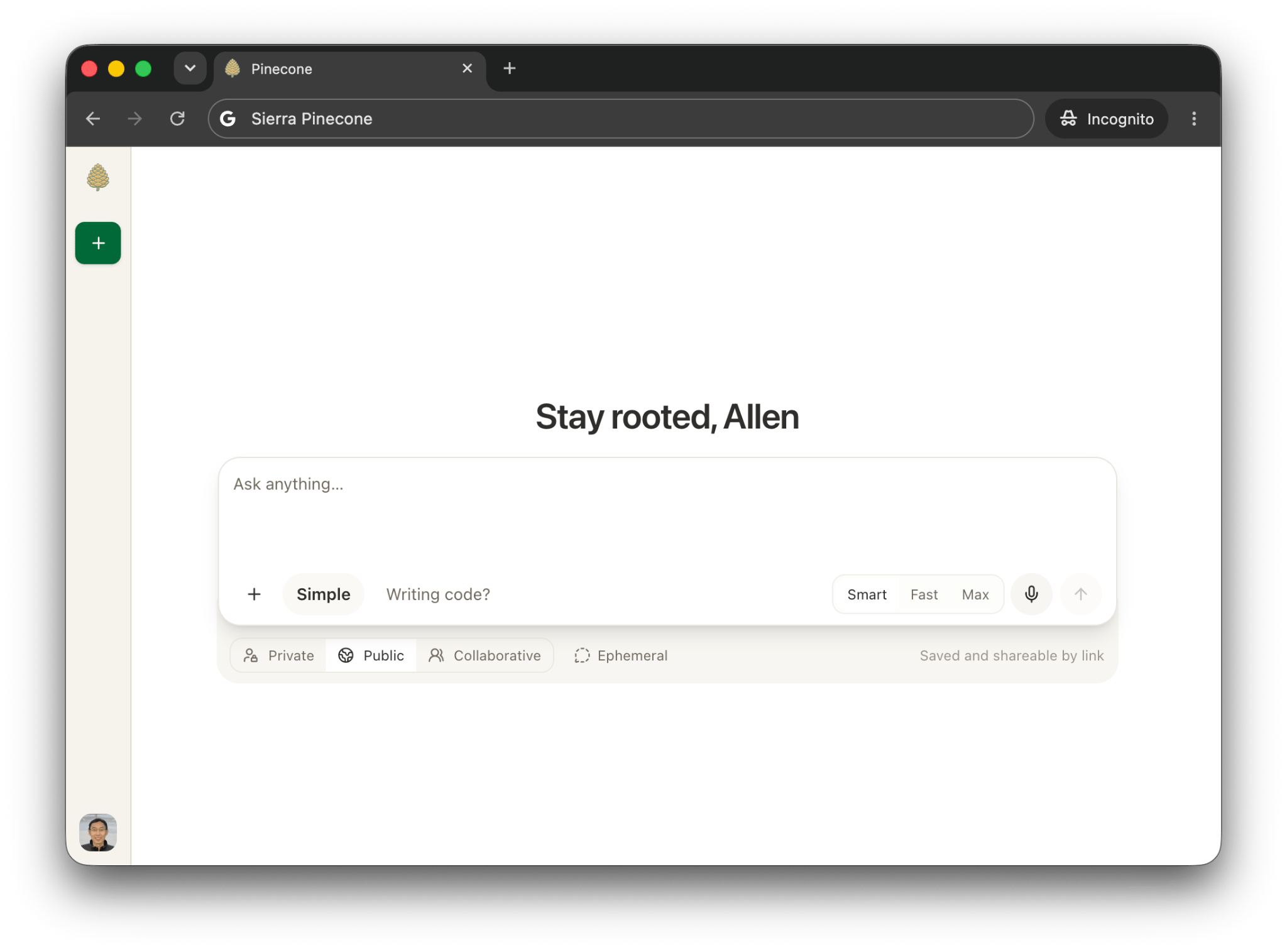
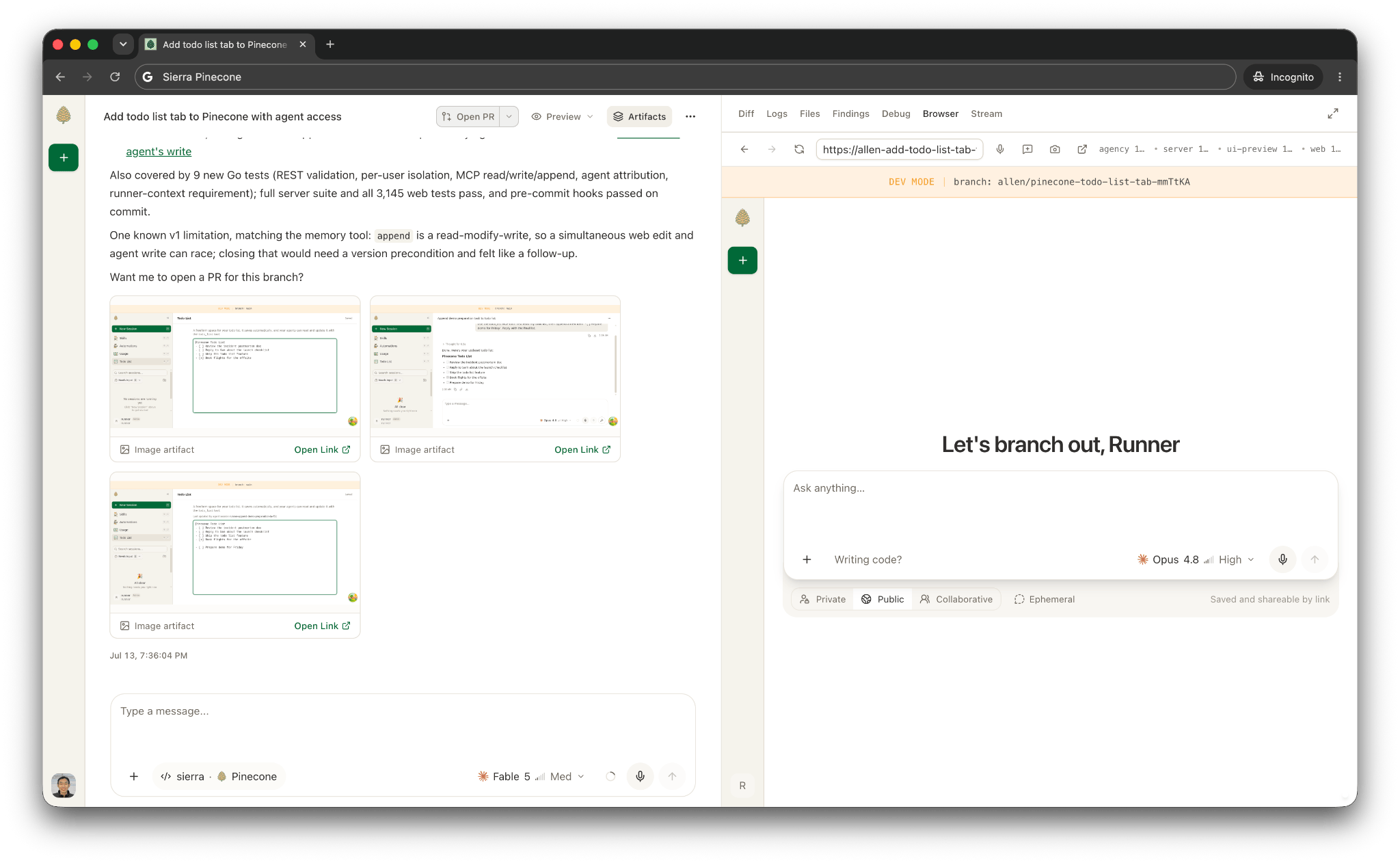
Pinecone enables every person to create, organize, and automate agents that live in the cloud. You can use it from your browser, Slack, Linear, even your phone — anywhere you work.
The primary unit is a session: It starts with a prompt — "identify a UX performance degradation" or "fix this flaky test", and Pinecone provides an isolated pod with a checked-out repository, warm build cache, running sidecars, hot-reloading dev servers, and a harness. The entire setup takes about a second. The session then streams its work back to you: text, tool calls, diffs, screenshots, files, and more. You can watch, interrupt, redirect, or close the tab.
Around that core, we built a handful of capabilities that are changing how people work:
- Multiplayer: When someone uses Pinecone to build a new feature, fix a bug, or overhaul part of the product, every part of the journey can be shared. The entire development and preview environment runs in the sandbox, and another user can branch the entire session — with their own MCP authorization — and continue independently.
- Brokered PRs and CI: A session opens its own pull requests, watches its own checks, and a monitor sub-agent babysits the PR afterward. It answers machine-review comments, automatically fixes failing tests, and pings you in Slack when a decision needs a human.
- Automations: Pinecone can observe Slack channels, Linear tickets, and more. It can answer questions, fix bugs, open PRs, or proactively scan your email, Slack, and other connections every morning and provide a list of action items. Automations can be triggered through webhooks or on a schedule.
- Skills: These are reusable playbooks that can be private, sharable, or default-on for all users. They range from things like "prepare a customer meeting brief" to "stabilize this flaky CI job." One person creates a skill for a particular workflow, and every future user benefits.
- Projects: As problems increase in complexity, multiple Pinecone sessions can be grouped together. They coordinate through shared, searchable context, send each other messages, read each other's public sessions, and generate new Pinecone sessions. A lot of work starts with one simple question, but as it evolves, that single session naturally becomes analysis, bug fixing, feature development, and post-deploy verification.
Agent, singular
Underlying all of this is a simple principle: there is one agent.
Whether you're in engineering, HR, sales, product, design, or data science, you don't pick a persona, toolset, sandbox profile, or data scope from a dropdown. You describe the task and Pinecone routes it. A classifier reads the prompt and selects the repository, environment, harness, model, and reasoning budget.
The session picks up new tools as the task evolves. A data analysis session about our LLM spend might discover a bug in logging, so the agent naturally opens a coding session to fix it. A sales engineer preparing a demo might identify discrepancies in the production experience and produce a pull request.
This mirrors how we hire. Sierra looks for people who move between disciplines. An agent should be at least as flexible as the people it works alongside, allowing them to move between coding, analysis, forecasting, operations, sales preparation, and more.
How it works
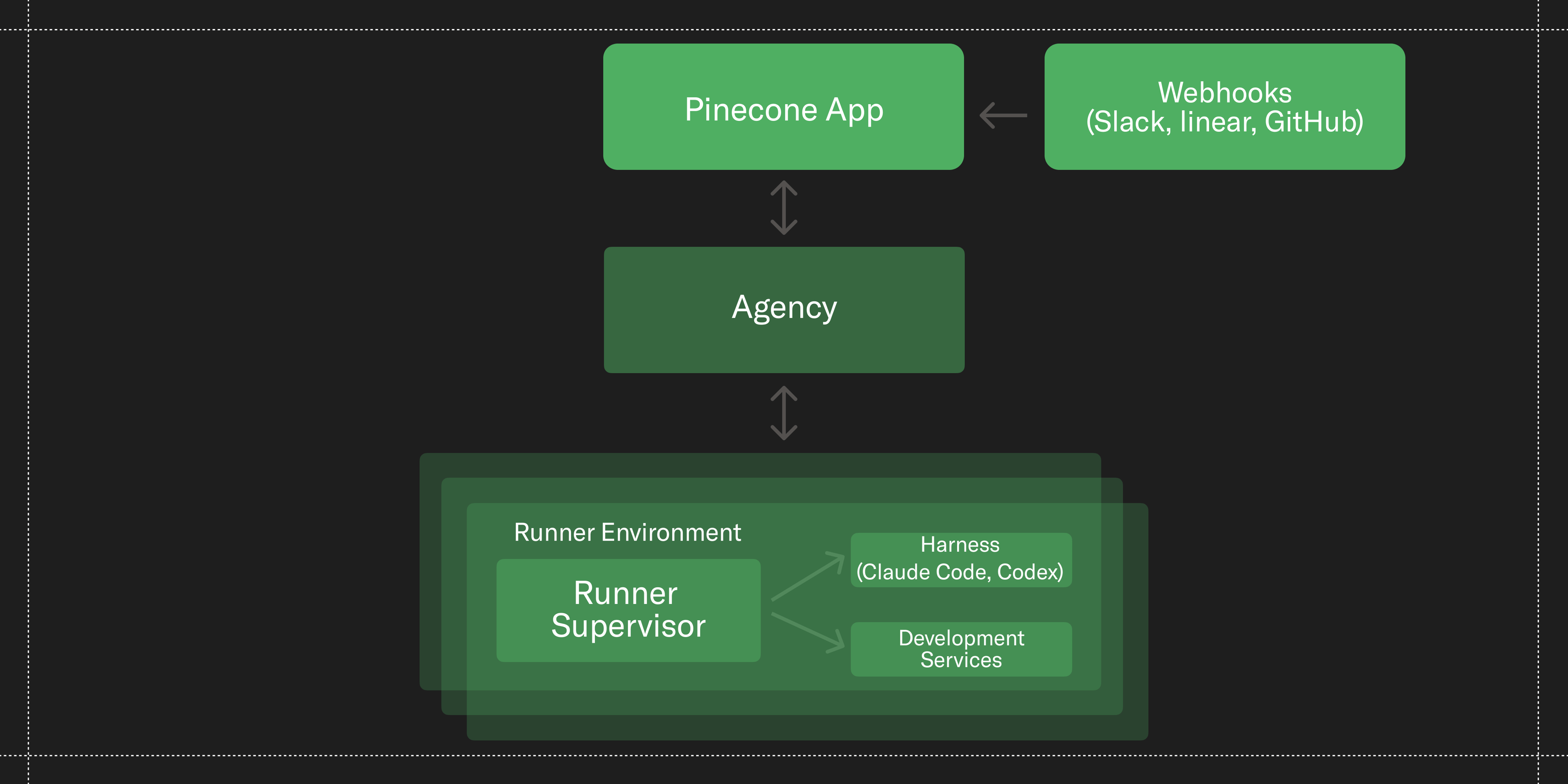
Pinecone has three major components: the app server, Agency, and runners.
- The app server is the product surface: the frontend, API, persistence, integrations, and the stream that sends agent output to every open tab. It records each turn, hands it to Agency, and subscribes to the runner’s stream as it executes.
- Agency manages isolated, recoverable runner environments. It reconciles each runner into a Kubernetes pod, uses Redis Streams for live communication, and stores durable events and checkpoints separately for recovery.
- The runner contains the agent and its environment. A Go process supervises Codex or Claude Code, manages the development services, and brokers privileged operations.
Durable Sessions
Pinecone sessions are durable, even though the sandboxes they run in are not. Harnesses crash, pods and nodes fail. We designed Pinecone so sessions can last hours, or even days, without losing conversations or uncommitted work. Agency continuously records each session's state so a replacement runner can resume exactly where the previous one left off.
The same mechanism also enables branches. And because spinning up environments is fast and cheap, people can experiment freely, compare different approaches, and collaborate without affecting the original session.
Multiplayer
We wanted Pinecone to be inherently shareable. A code change should produce a live prototype someone else at the company can see and interact with. A session with analysis should produce a dashboard artifact others can explore.
Coding sessions expose live development previews that can be shared. Feedback is incorporated as people talk, the prototypes hot-reload in real time, and everyone in the discussion can see the changing working application in their browser. We've also built plugins that let users point-and-click in the preview, describe the exact UI changes they want, and watch the agent implement them immediately.
Privileged Operations
The harness runs in an environment with limited access to the network and filesystem. When it reaches an inference provider, GitHub, or anything else that requires authentication, the network proxy approves (or rejects) the request, swaps in the appropriate credentials, and forwards the request.
In this way, the agent never has access to real credentials. As with most agentic environments, we let the agent assume it can do everything, yet trust nothing.
Platform
Pinecone is also a platform that is pluggable with all other internal tools at Sierra. Our internal systems plug into Pinecone and create sessions: incident management workflows, code review assistance, internal Q&A bots, and more.
Iteration
Some of Pinecone's best features came directly from watching the company use it.
One example was intent-based routing. We watched people struggle with repository and sandbox choices. Non-technical users couldn't know whether a task needed 8 CPUs or 0.1 CPU. Now, a model classifies the task and recommends the right model and environment. If the task changes mid-session, Pinecone can provision a new environment with the same context.
Another was PR monitoring. Automated code review tools are great, but most comments are routine to fix. Rather than asking engineers to come back later, Pinecone watches its own pull requests, automatically addresses most review comments and failing tests, rebases in the case of merge conflicts, and only brings people in when judgment is required.
What we learned building Pinecone
An agent is only as useful as the environment you give it: For engineers, that means the full Sierra development environment: GitHub, our toolchain, local services, browsers, and everything needed to verify its own work. Other teams needed completely different set-ups, with the right data, permissions, and Sierra best practices already configured.
Building those environments turned out to be one of the hardest parts of Pinecone. Every role needed a different combination of tools, context, permissions, and infrastructure — all assembled on the fly, without compromising security, speed, or reliability.
We couldn't find a cloud agent provider that met those requirements, so we built it ourselves.
This had the added benefit that we could leverage the same infrastructure for Ghostwriter — our customer facing agent for building agents. And the best part: as everyone at Sierra lives in Pinecone and dogfoods the product, the reliability, performance, and quality wins are shared with Ghostwriter.
Centralize the improvements: When everyone at a company works through one platform, you can create a single point for shipping best practices without slowing anyone down.
Cost is one example. We want people to think about what they can do with AI, and not their token usage. So we don’t publish a leaderboard of token usage but instead centralize visibility and accountability for costs with a small team who manage it at scale — eliminating waste, setting proper defaults, and building efficiency features like model routing.
As adoption of Pinecone grew, we only found more opportunities to centralize improvements. When a harness misbehaves — has the wrong configuration set, calls the wrong tool, misses an AGENTS.md, or burns tokens on an ill-thought through approach — we can see it and fix it once for everyone. Other patterns like “plan with Fable, execute with 5.6 Terra” can be set as a default for certain use cases. Because every session runs through Pinecone, we can identify common patterns, evaluate its effectiveness, and improve the platform itself.
Stand on the shoulders of giants: Companies like OpenAI, Anthropic, and Cursor pour enormous effort into agent harnesses. So we designed Pinecone to leverage the ongoing research and investments of the large language models. We installed Codex and Claude Code in every sandbox, wrapped in an adapter that speaks a common protocol based on AG-UI. This had multiple benefits.
It provides optionality for Sierra, enables us to route traffic from one provider to another, gives employees choice over the models and harnesses they use, and ensures Pinecone gets better as the harnesses improve.
Build primitives, not workflows: We found early on that workflows didn't last long. The models got too smart, the workflows had to be rewritten, and people had to be retrained.
Instead, we built opinionated primitives: better context, environments, and company-specific tools. Those primitives proved far more durable and let people compose their own workflows as the models improved.
This was also a key lesson in bringing the tool to the users, rather than the other way around. Instead of designing a grand new workflow, we built Pinecone around what employees were already familiar with: ChatGPT and Claude, Linear, and GitHub. We met people where they were, scaled adoption much more quickly, and unlocked far more creativity across the company.
Turn employees into builders: We had many alpha and beta testers who, admittedly, were working with buggy, experimental versions of features that didn't work. But so many people were invested in getting it to work for their own use cases that we built a large cohort of enthusiasts. Feedback, ideas, and pull requests flooded in from every part of the company. Through this early cohort, we found our Pinecone champions, who ultimately helped scale adoption across Sierra.
What happened
- In the last month, 600 people have created more than 75,000 sessions, with usage accelerating week-over-week.
- The majority of the company works in it every day. 96% of engineering now uses Pinecone.
- In the last month, 70% of our PRs were opened through Pinecone.
- Usage has tripled every month since April, yet costs have fallen.
More importantly, the way we work has changed. Engineers describe outcomes and review apps instead of writing every line of code. Incidents receive a first-pass investigation before a human joins. Account teams wake up each morning with a digest that helps them prepare for the day.
Pinecone is also built in Pinecone. The platform team ships to themselves, their harshest power users, and ultimately the entire company. Every improvement is picked up immediately by every employee.
Honing the happy customer machine
One of our founders, Clay, likes to describe Sierra as a machine for producing happy customers. That machine isn't just Agent OS. It's the entire company: our products, our people, and the way we work together.
Pinecone helps us continually hone that machine. As frontier models improve, every business will have access to extraordinary intelligence. What will remain unique is a company’s context — in particular the accumulated knowledge, judgment, and experience of their workforce.
We’re betting that the companies which can best capture, share, and compound that wisdom will build some of the deepest competitive moats.