Who monitors the monitors?
Agents can think and take action independently, which makes them well-suited to handle the messiness of real world conversations. But that same adaptability makes them harder to evaluate. For example, an agent may respond in under a second, yet miss key information a customer already provided or signs that they’re getting frustrated.
Monitors, Sierra's always-on evaluation layer, use an LLM-as-judge to review every conversation so businesses can track agent quality and customer sentiment — continuously improving the experience over time. That raises the question: who evaluates the monitors? Each monitor goes through a rigorous evaluation loop grounded in team-labeled conversations and model agreement.
Here’s how we do it.
Monitors you can trust
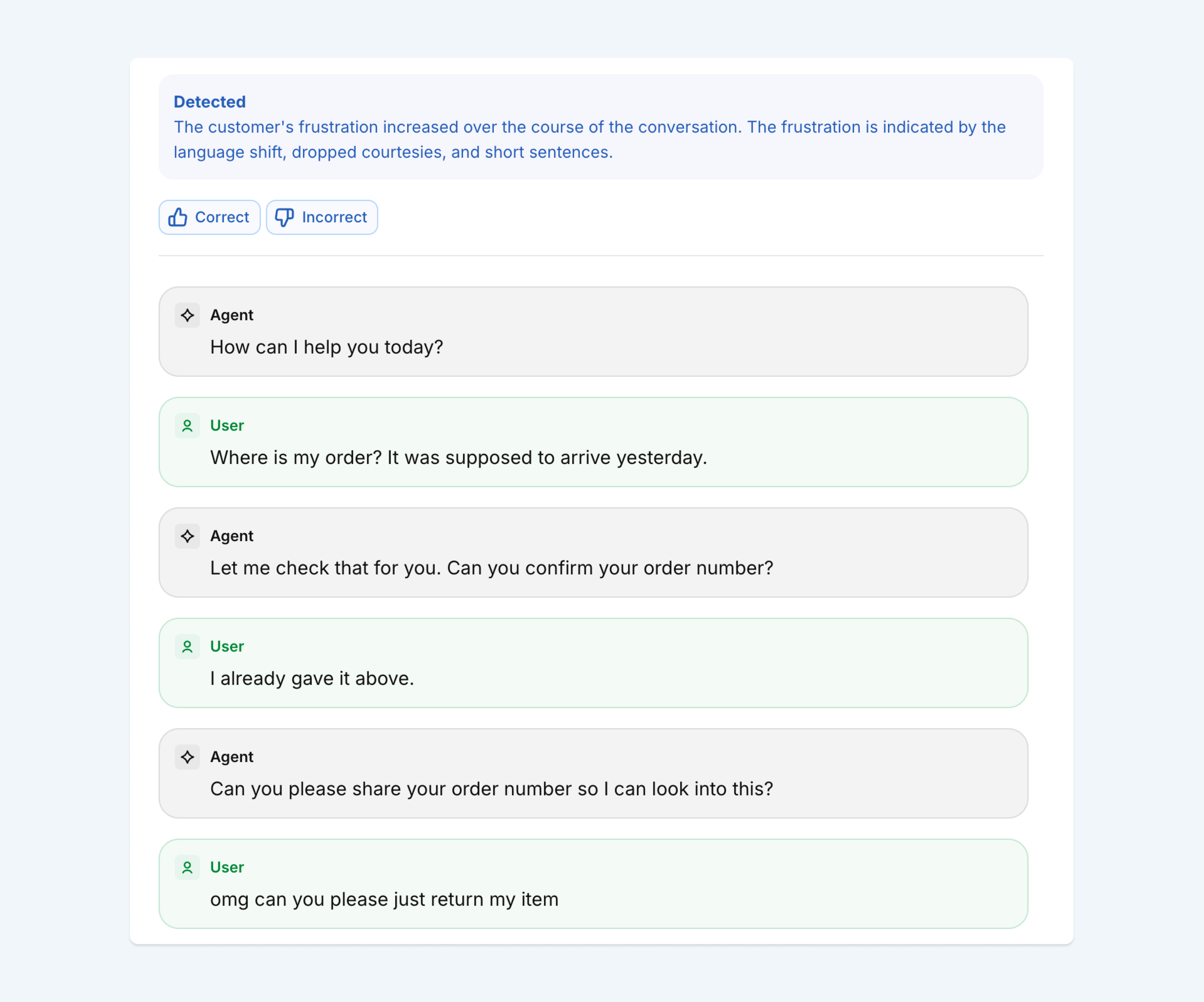
Businesses need to trust the quality of the monitors they use, and that starts with how they’re built. Imagine a retail business that wants to track frustration across a “Where is my order” (WISMO) workflow:
User: Where is my order? It was supposed to arrive yesterday.
Agent: Let me check that for you. Can you confirm your order number?
User: I already gave it above.
Agent: Can you please share your order number so I can look into this?
User: omg can you please just return my item
The user is clearly getting annoyed, but the signals are subtle: a politeness marker ("please"), no profanity or explicit complaint, just sarcasm and a pivot from checking on an order to requesting a return.
Picking up on these nuances is difficult. It requires training monitors to recognize exactly what to look for, and when. We do that through a rigorous evaluation loop.
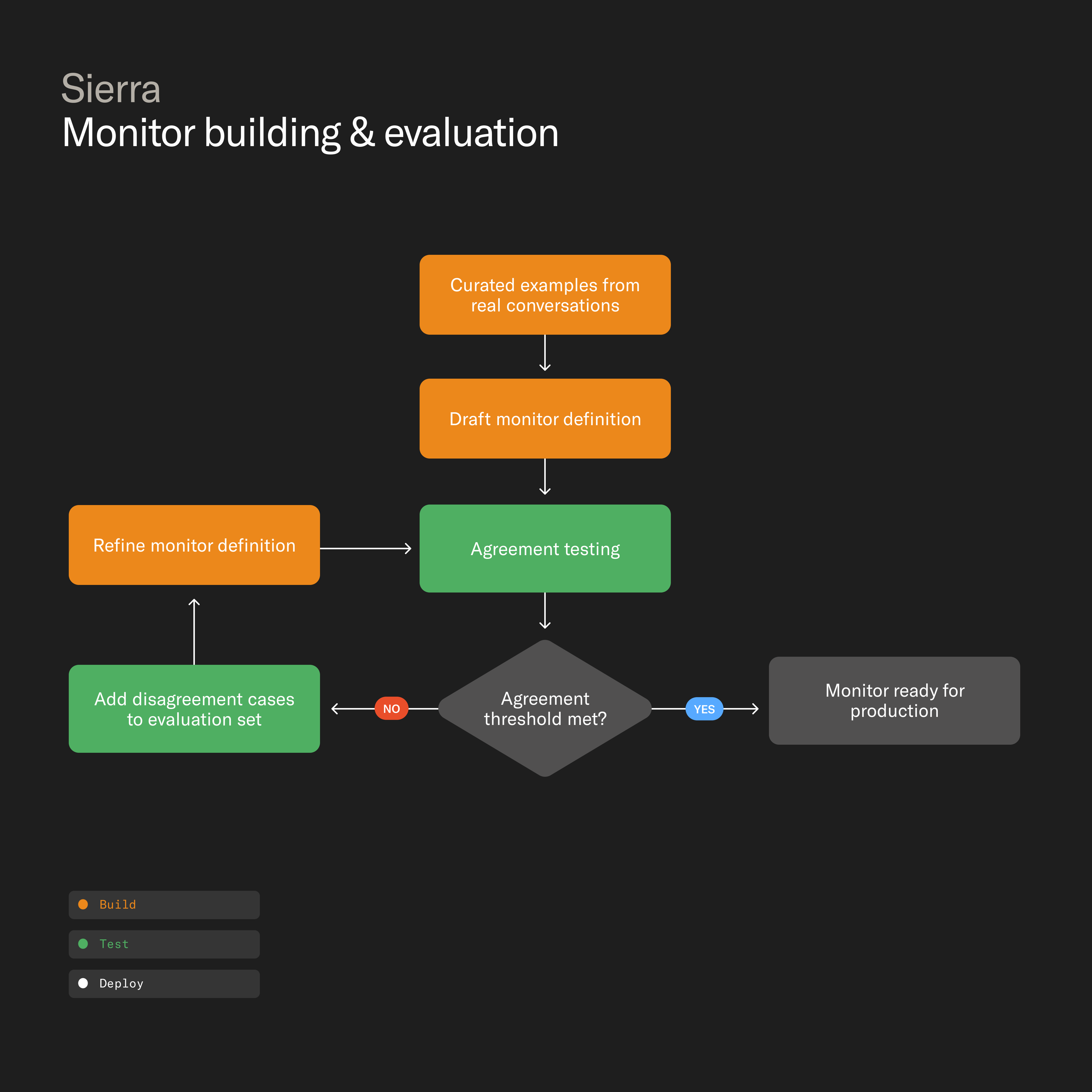
Each monitor starts with a precise definition of the behavior the monitor is meant to detect, and each definition is grounded in hand-curated examples from real conversations. Multiple models then evaluate those conversations and then compare their outputs against labels the team has created. When they disagree, it often reveals where a definition is too broad, too narrow, or missing context. Those edge cases are fed back into the training and evaluation sets until the models agree consistently — and the reasoning behind each flag is clear.
But accuracy isn't enough. For every flagged conversation, we surface the monitor's rationale so a reviewer can see what it picked up on, and decide whether to act.
Custom monitors for your business
Sierra ships with out-of-the-box monitors for common issues like looping, increasing frustration, and false transfers. But every business is different, with behaviors specific to its product and policies. Agent Studio lets teams create custom monitors for the signals they care about using a simple natural language interface.
Once defined, those monitors go through the same evaluation process we use for those authored by Sierra. For example:
- A financial services company flags unauthorized investment advice or language that raises fair lending concerns.
- A healthcare organization confirms that sensitive calls are routed to the right clinical pathway.
- A travel company monitors whether the agent is consistently surfacing loyalty benefits at the right moment in a conversation.
A flywheel for agent quality
Monitors began as Sierra's always-on evaluation layer, continuously reviewing every conversation and pointing teams to the ones that need attention. Today they're part of a broader loop for improving agent quality.
Monitors surface where agents can improve. Explorer helps teams understand how and why those behaviors show up. Ghostwriter makes it quick and easy to act on those insights. Together, they create a continuous flywheel for agent quality: build, observe, understand, improve.