Building Sierra’s MCP Gateway: An engineering iceberg
This is part of our series on how we're AI-pilling Sierra.
In our last post, we wrote about Pinecone, an internal agent we built to make employees more effective. One of the biggest challenges in building Pinecone was making sure it had access to the right context, which is the lifeblood of any great agent. Even the best models struggle if they can't access the information a human has at their fingertips.
At Sierra, that context lives everywhere: Slack, GitHub, Salesforce, our data warehouse, production systems, internal docs, and dozens of other SaaS products. Just as we converged on a single agent in Pinecone, we wanted one “gateway” that safely connects AI agents to the tools and systems that power our company. It’s powered by Model Context Protocol (MCP), which has quickly become the standard way for exposing tools to AI agents. With MCP being “ancient” technology by AI industry standards (i.e older than a year), this should have been straightforward. In practice, it became one of those deceptively large engineering icebergs that we've learned to recognize at Sierra.
We wanted to share the biggest lessons we learned while building the gateway — and, more broadly, what it looks like to build software in an AI-first engineering organization.
Lesson 1: “Grab the lock” (reduce coordination and collapse roles)
One phrase you'll hear on Sierra's AI Acceleration team is "grab the lock."
It means, roughly, "I'm taking ownership of this area. Check with me before making changes."
That might sound counterintuitive in a fast-moving startup environment, but we've found the opposite to be true. As individual engineers become dramatically more productive, coordination (versus implementation) becomes the bottleneck. It also avoids the temptation of sending off a coding agent on a side-quest to implement an idea you might have had, if the idea is at odds with the lock holder’s broader vision.
This was especially important early on as everyone at Sierra wanted their agents connected to something different: sales to the CRM, recruiting to the applicant tracker, engineers to the data warehouse. Every team could have built its own integrations, permission model, and auditing system, but that would have created several slightly different versions of the same infrastructure.
Instead, we built one gateway for everyone.
Once it was usable, we switched hats from engineers to product managers. We recruited early adopters, onboarded them, and created a shared Slack channel that still serves as the primary place for feature requests and feedback (while the most AI-pilled users will be constantly checking the gateway for new services and tools, most users still benefit from the occasional feature roundup post).
So far, grabbing the lock has paid off. Permissioning, auditing, and legal review only had to happen once. No team built a similar-yet-not-really integration stack. And ideas that might have become one-off side projects instead arrived as feature requests that benefited everyone.
Lesson 2: Coding agents still need humans
One of the keys to successful agentic development is giving coding agents a way to verify their own work. For the gateway, that sounded simple: implement a tool, then call it to make sure it works. In reality, we were reminded of something that has been observed over and over again:
Coding agents love to cheat.
If authentication was broken, they'd "helpfully" read the correct token from a local database instead of fixing the problem. If an MCP server wasn't fully spec compliant, the agent would fall back to manual HTTP requests via curl, then declare success. So instead, for final validation or smoke tests, we used consumer-grade agents like ChatGPT or Claude. Their more limited capabilities ensured the agents would only use the official functionality.
We also found that agents would solve problems at the wrong layer, or not be aware of key system properties. To fix that, we created a living mcp-gateway.md document that captures the system's core design principles. Every major task asks the agent to read it before starting and update it when completed. It's become one of the highest-leverage practices on the project, dramatically improving our one-shot success rate. The challenge isn't writing more documentation — it's capturing the most relevant information. Serving as the “curators” for that document has at times felt like our most important contribution.
Finally, some gnarly problems still require a human to look at the data. Adding an integrated MCP Inspector made it much easier to inspect the underlying data and establish ground truth when agent conclusions didn't quite add up.
Lesson 3: An agent can't misuse what it never sees
The best way to make sure that an agent can’t do something unexpected with sensitive data is to avoid giving it that data in the first place. We therefore spent a lot of time on tool design in the gateway, deciding what is safe to expose and when.
The first challenge that forced this realization was preventing cross-customer access. Sierra's customers trust us with sensitive information, and our agent engineers help build many of our customers’ agents. A nightmare scenario would be an agent reading one customer's internal operating procedures and "helpfully" reusing them for another.
While our production systems are already partitioned by customer identity, the gateway also exposes sources of information that are gray areas: Slack channels, internal documents, ad hoc analytics, and other data that doesn't naturally have such sensitivity or provenance metadata.
Forbidding their use would negate the benefit of the gateway, so we wanted to find a way to do this safely that could work for any data source. We built up a full audit log of data that was accessed about our customers, blocking attempts to access sensitive data about multiple ones in the same session. To do this efficiently, it is a multi-pass system:
- A deterministic phase builds a list of candidate customers the data may be about
- A fast model does an initial pass over those candidates to narrow them down
- A slower model does a final pass to determine the customer (if any) and the sensitivity of the data
There may be legitimate business reasons to look at data across customers, for example in incident investigations. We therefore allow users to approve this kind of cross-customer access, but it happens out-of-band, requires explicit approval, and also gets added to the audit log.
Building that system ultimately made the gateway possible. It gave our legal and compliance teams confidence that we could safely roll it out across the company. It also showed the value of “grabbing the lock” — otherwise every team would have had to develop a similar system.
Lesson 4: 80% of a workflow rounds down to 0%
We had to go the full depth of the iceberg to make the gateway successful. Unlike the usual 80/20 heuristic, an automation tool that only covers 80% (or even 90%) of a user’s needs delivers 0% of the value. It needs to support the full workflow (or be end-user extensible), otherwise users won’t get most of the gains. That lesson became obvious as adoption spread.
Many official MCP servers exposed dozens of tools, but they didn't quite match how our employees actually worked. For example, when the Sales team kicked off its own “AI acceleration” effort, we discovered they are much heavier users of email, and the tooling that we exposed through the gateway was pretty limited (plain text email sending feels sufficient to engineers, but is a bit lacking in pizzazz).
We added a REST extension mechanism that let us augment existing servers with missing functionality, replace tools that didn't fit our workflows, and remove or replace ones that were potentially unsafe. Each new group of users redefined “the full workflow”. Getting to 100% sometimes meant giving up some of the architectural purity of the gateway. Production investigation workflows centered on tooling like Grafana and OpenSearch, which didn’t neatly map into our “proxied remote servers or native tools” model. Additionally, we need them to provide data for each cluster or region that Sierra runs in. We ended up introducing two new subsystems:
- Sidecar services, requiring a local MCP server to be run as another process next to the gateway
- Multi-region services, where we run multiple instances of each service, one per region
While the gateway became more complicated, we kept it simple for users. The “sidecar” distinction is an implementation detail, and regions manifest themselves as an injected region parameter to tools, instead of introducing a new concept.
Lesson 5: Avoid the strategy tax
One of the services we connected to the gateway was Pinecone itself, allowing its sessions to be listed, read, and created. This makes it possible to hand off work from local coding agents to Pinecone or vice versa.That way, the gateway is tightly integrated with Pinecone, but it doesn't require it — in other words, we avoid the “strategy tax.” As new tools emerge, we want employees to use whichever agent works best for the job. For example, when Claude Design launched it was possible to give it access to real data from day one, instead of waiting for the equivalent functionality to be added to Pinecone. And if Pinecone is down, you can still investigate a production outage with a local coding agent plus the gateway.
Supporting all clients has a cost, though. At times development on the gateway reminded us of the early days of web development: just as it was a guessing game as to whether the same HTML would work in both Netscape and Internet Explorer, we would struggle to get the full gateway capabilities working in Pinecone, local coding agents and hosted ones.
Fortunately, it's 2026 instead of 1996, and debugging OAuth flows, figuring out a client’s heartbeat expectations, and reverse engineering tool name validation rules are exactly the sort of work agents excel at.
Lesson 6: Don't fight the weights
Not every integration makes sense. As an example, GitHub and its full-featured MCP server was one of the first that we exposed through the gateway. However, agents would spend a lot of time discovering its hundreds of tools, and large responses would bloat the context window.
As an alternative, agents are very familiar with the gh CLI, having encountered it a lot in their training. It also provides more efficient access to the same data (the output can be filtered or piped to a file for later processing). We were initially wary of exposing the CLI to Pinecone sessions — we want all write or destructive operations to be tied to user intent and approval. We came upon the compromise of having Pinecone mint a separate GitHub token that only gives read-only access to specific repositories, and giving that to the agent to use when invoking the gh CLI. This lets it work with familiar tools, but in a safe way. We made the same call for AWS access, preferring the aws CLI over proxying it through the gateway.
Lesson 7: Human identity and agent identity — you need both
As more automations became agent-driven, another challenge emerged: identity.
The rules of thumb we landed on:
- Interactive work runs as the user.
- Scheduled or shared workflows run as service accounts with only the permissions they need.
Interactive work (actively using an agent to accomplish a task, like writing code) should run with a user's identity, permissions, approvals, and audit trail. Anything recurring or shared (scheduled automations, monitoring bots, team workflows) gets a service account, so it carries only the access it needs and doesn’t break (or worse, quietly keep running with one person’s broad access) when its author changes roles or leaves.
For automations that access customer data, we added another safeguard: pre-authorized workflows that explicitly declare which customers and tools they're allowed to access before they ever run.
We also had to shift the way we scaled these decisions. As more teams requested integrations, configuring and maintaining every SaaS connection ourselves became too much. Instead, we introduced service owners, allowing the people who actually understand a system to own its integration with the gateway, so ownership moves closer to the people with the most context.
Releasing the lock
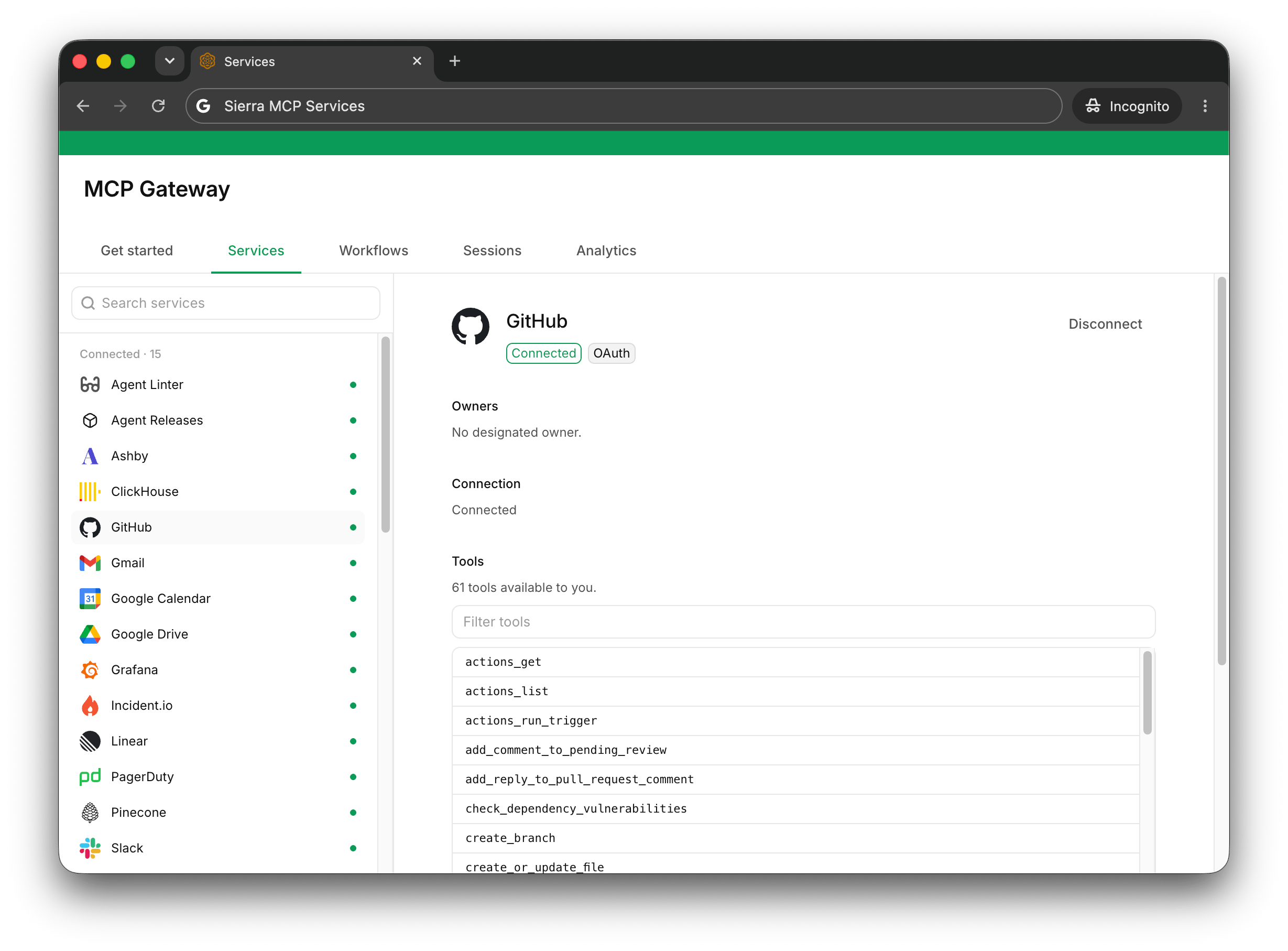
The gateway has become what we hoped it would: plumbing.
Today, 89% of Sierra employees actively use it to connect AI agents to 45 different services through a simple interface: visit one page, connect the tools you use, and get to work. The complexity stays below the iceberg’s surface unless you're building the system itself.
What has been more surprising has been how community-owned it is: Now, nearly two-thirds of commits come from others (versus from the two of us who started the project) — typically prompting Pinecone to add the tool they needed. Now that the gateway can increasingly improve itself, we're finally releasing the lock.