Workspaces: move fast without breaking things
Building highly capable, high-quality agents is a team effort. As agents take on more mission-critical parts of the customer experience, more people need to be involved: no‑code builders shaping journeys, operators tuning configurations, and reviewers validating behavior before changes go live. With multiple workstreams in flight, the hard part isn’t making changes — it’s coordinating them in a way that’s safe and transparent.
That’s why we built Workspaces — bringing the collaboration model that's powered software teams for decades, from tools like GitHub to Figma, to agent development. Just as engineers work on different parts of a product at the same time, teams can now collaborate in parallel across every part of their agents, review changes in context, and merge updates deliberately before releasing them with confidence. Agents are increasingly core to the customer experience, and they deserve the same care and rigor as the rest of your product.
Customers across industries are already using Workspaces to bring their entire organization into the agent development process, uniting builders, operators, and reviewers in one coordinated workflow. In fact, one leading fintech company is using Workspaces to bring more than 200 team members to the Sierra platform to collaboratively build, operate, and manage their agent.
Multi-player by design
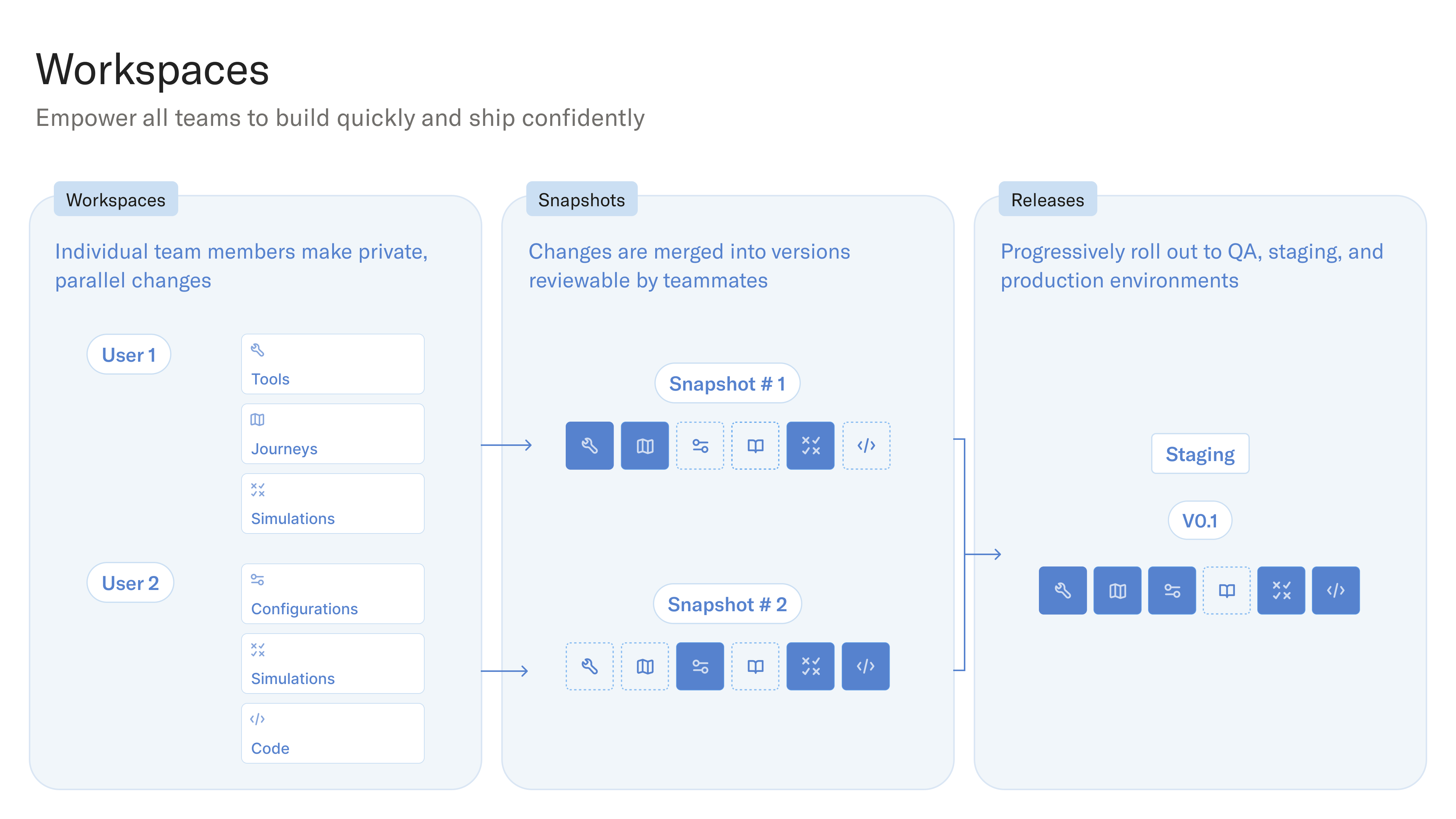
Workspaces are built for parallel work and follow a simple loop:
- Build and test in your Workspace.
- Merge to create a snapshot — a clear, point-in-time version of your agent.
- Release by promoting snapshots to QA, staging, or production environments.
Build in your Workspace
Every team member gets their own Workspace where they can iterate freely and safely across journeys, simulations, tools, configuration, knowledge, and code.
Changes stay local until you’re ready to merge them. That means multiple people can work on the same agent at the same time — experimenting, refining, and testing in parallel, without coordination overhead.
Before merging, you can thoroughly test your changes. Run existing Simulations to catch regressions, auto-generate new ones to stress-test new journeys, or manually interact with the agent in Dev Chat using any modality.
Merge changes across your team
When you’re ready, merge your changes. Once merged, updates automatically flow to everyone else’s Workspace, keeping the whole team aligned on the latest version. If multiple people edited the same area, Workspaces surface conflicts clearly and let you resolve them directly in Agent Studio.
Think of a Workspace like a collaborative draft — or a feature branch for your agent. Isolated while you’re working, shared when you’re ready.
Release with full control
Every snapshot moves through a unified release pipeline, whether developed in code or no-code. Teams can promote changes to staging and production environments, audit what changed and when, and roll back instantly if needed. These ideas have been proven for decades in software development, and workspaces make them intuitive for agent builders across CX, Operations, Product, and Engineering.
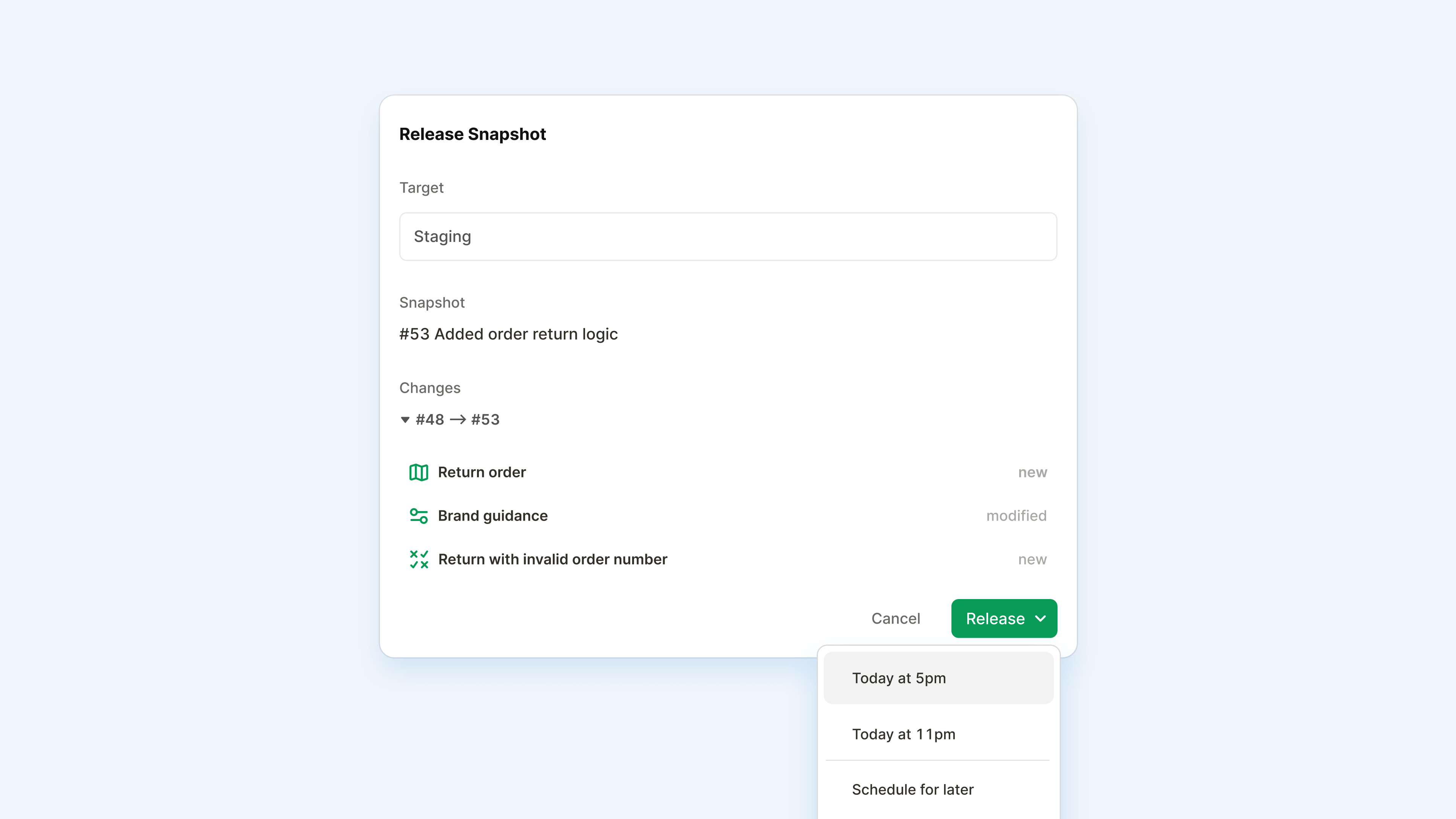
CI/CD integrations are fully supported for teams that want deeper automation, while no-code teams can schedule releases directly in Agent Studio. With CLI support, GitHub Actions integrations, snapshots that link back to PRs, and automated or scheduled promotions from staging to production, teams get both rigor and speed.
Built for collaboration at scale
With Workspaces, teams ship faster with more confidence. Changes move from idea to production through a clear, predictable path — whether you're working in Agent Studio or pushing code.